
This is the actual process of me setting up a new investment account and investing £10,000 of my own money with instructions and screenshots, following my Invest Without Being Ripped Off insider knowledge to keep my costs really low, my diversification and risk appropriate for me, and then being able to walk away and forget my investments for a year.
These are the different stages that I cover on this page. Scroll down or click on the ones of interest:
Setting up a new investment account with Interactive Investor
Using the most appropriate model portfolio
Identifying the funds I need to buy
Working out how much of each fund I need to buy
When I prefer to buy and sell funds
The allocations won’t match the model precisely
Finding the first fund I want to buy in my new portfolio
Placing the order for the first fund
Viewing the order list to see the fund I’ve bought
Buying the second fund
Buying the third fund
The fourth fund – a slightly different process because of the fund’s daily pricing
Reviewing the funds I’ve bought
A couple of days later all four fund purchases are showing on my account
Next steps
Setting up a new investment account with Interactive Investor
Interactive Investor is good for:
- Share-dealing accounts
- ISAs
- SIPPs
Firstly, I go to Interactive Investor*
I click on the “Services” tab at the top of the page and then click the appropriate one of the following options:
- Stocks and Shares ISA
- Trading Account (i.e., a general investment account)
- SIPP
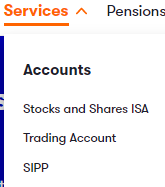
In the following example, I’ve chosen to set up a SIPP:
I then go through the process of submitting my personal, tax, employment, National Insurance and debit card details.
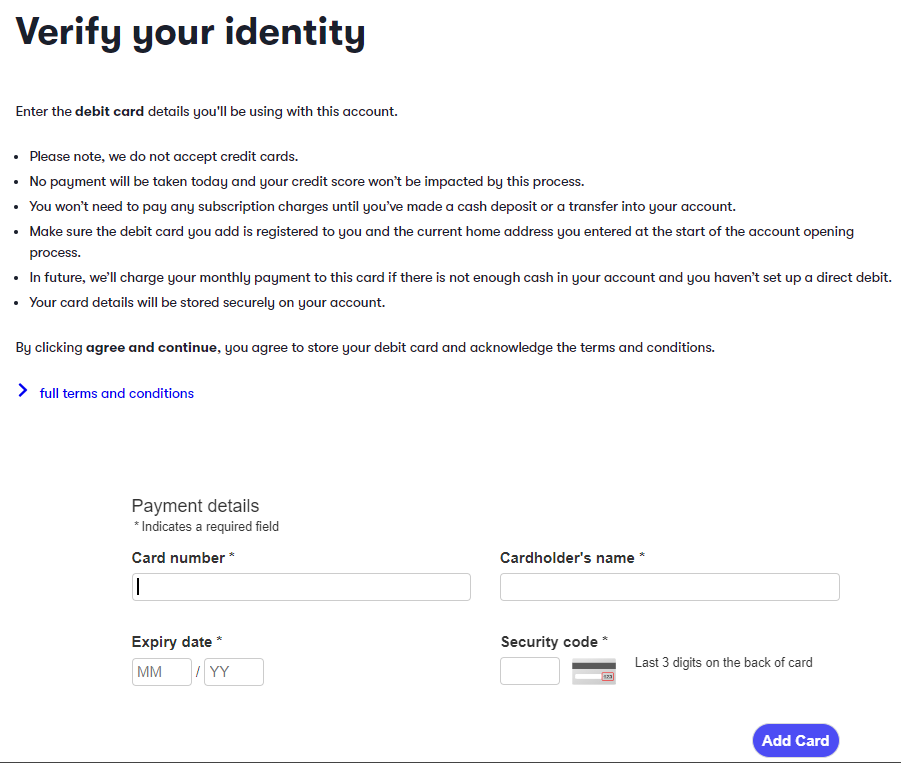
Once I’ve uploaded these details, confirmed my identity (by submitting my driving licence or passport information) and uploaded some money, I’m ready to allocate the money to the appropriate funds.
Using the most appropriate model portfolio
In this example, I’m going to invest £10,000. Having completed the risk questionnaire earlier in this book, I have confirmed that my risk tolerance is “higher”.
Therefore, the model portfolio I’m going to copy is the Tier 2, Higher-Risk Model Portfolio (see Portfolios I Copy – Tier 2):
| Cash* | Global Government Bonds |
Global Corporate Bonds |
Global Shares |
Alternatives | |
| Lower-Risk | 1%* | 41% | 25% | 33% | 0% |
| Medium-Risk | 1%* | 21% | 22% | 51% | 5% |
| Higher-Risk | 1%* | 8% | 8% | 78% | 5% |
Identifying the funds I need to buy
Looking at the lists of funds on {website page}, I can see that these are the cheapest funds that I need to buy for my new portfolio:
| Asset Class | Fund | OCF | ISIN |
| Global Government Bonds | Amundi Index Solutions – Amundi Prime Global Govies UCITS ETF DR (PRIG) | 0.08% | LU1931975236 |
| Global Corporate Bonds | L&G ESG GBP Corporate Bond UCITS ETF | 0.08% | GB00BPFJD529 |
| Global shares | Amundi Index Solutions – Amundi Prime Global UCITS ETF DR (PRIW) | 0.78% | LU1931974692 |
| Alternatives | iShares Developed Real Estate Index Fund (IE) Class D GBP | 0.05% | GB00B5BFJG71 |
Working out how much of each fund I need to buy
Trust me, this is a simple calculation.
If you wanted to know what 1% of a number is, you’d multiply the number by 0.01.
For example, 1% of £9,337 is 0.01 x £9,337 which equals £93.37.
Here are three more examples of to make things clear (I hope!):
2% of £9,337 is 0.02 x £9,337 which equals £186.74
87% of £9,337 is 0.87 x £9,337 which equals £8,123.19
100% of £9,337 is 1.00 x £9,337 which equals £9,337.00
The calculation in my new £10,000 portfolio
I want:
1% in cash i.e., 0.01 x £10,000 = £100
8% in global government bonds i.e., 0.08 x £10,000 = £800
8% in global corporate bonds i.e., 0.08 x £10,000 = £800
78% in global shares i.e., 0.78 x £10,000 = £7,800
5% in alternatives i.e., 0.05 x £10,000 = £500
To make sure I’ve got the calculations correct, I add the numbers up. In this case, they should add up to £10,000: £100 + £800 + £800 + £7,800 + £500 = £10,000.
To show you what this means, here’s the fund table again, but with the allocations added:
| Asset Class | Fund | OCF | ISIN | £ Allocation |
| Cash | Leave this as cash in the account. Don’t buy anything with it. | £100* | ||
| Global Government Bonds | Amundi Index Solutions – Amundi Prime Global Govies UCITS ETF DR (PRIG) | 0.08% | LU1931975236 | £800 |
| Global Corporate Bonds | L&G ESG GBP Corporate Bond UCITS ETF | 0.08% | IE00BLRPQM83 | £800 |
| Global shares | Amundi Index Solutions – Amundi Prime Global UCITS ETF DR (PRIW) | 0.78% | LU1931974692 | £7,800 |
| Alternatives | iShares Developed Real Estate Index Fund (IE) Class D GBP | 0.05% | GB00B5BFJG71 | £500 |
When I prefer to buy and sell funds
The market for shares, bonds and funds opens at 8am, UK time. For the first hour or so, prices of everything can jump around as big traders (banks and the like) digest news that’s come out since the market closed the previous day.
I prefer to wait until that’s all calmed down and prices have settled into what buyers and sellers generally agree to be a fair price for the time being. The next jumble of chaos comes when the US markets open at 9.30am New York time which equates to 2.30pm UK time.
 Rip-off Tip-off
I prefer to buy and sell funds between 9.30am and 2pm London time.
Things tend to be fairly calm during those hours
And, in case you hadn’t guessed, markets are closed on public holidays and weekends. Some funds can’t be bought outside trading hours but orders can be placed to buy them when markets open the next day.
The allocations won’t match the model precisely
I’ll aim to buy as close to £800 of global government bonds, £800 of global corporate bonds, £7,800 of global shares and £500 of alternatives as I can. But in each instance, the actual amount I buy will be slightly less. This will leave me with slightly more than £100 in cash in the account, and that’s fine.
By the way, I have more than £10,000 in my Interactive Investor SIPP in the screenshots shown below – don’t be confused!
As part of testing the Interactive Investor platform, I set up and put some money into a SIPP account. I then forgot about that and transferred a further £10,000 from my existing SIPP.
Finding the first fund I want to buy in my new portfolio
I click “Find & Invest”
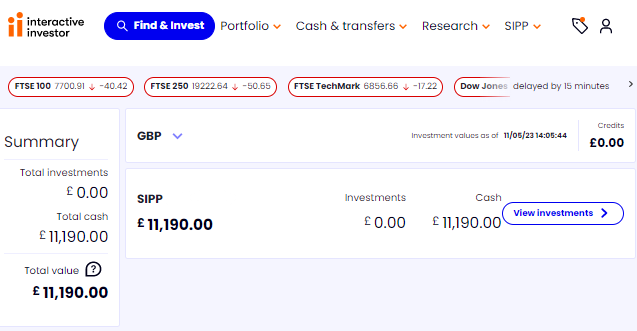
Which brings up the “Investment search” box:

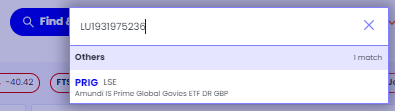
Next, I enter the first ISIN and the fund automatically appears below:
Placing the order for the first fund
Now I click on that fund, which brings me to the “Place an Order” option:
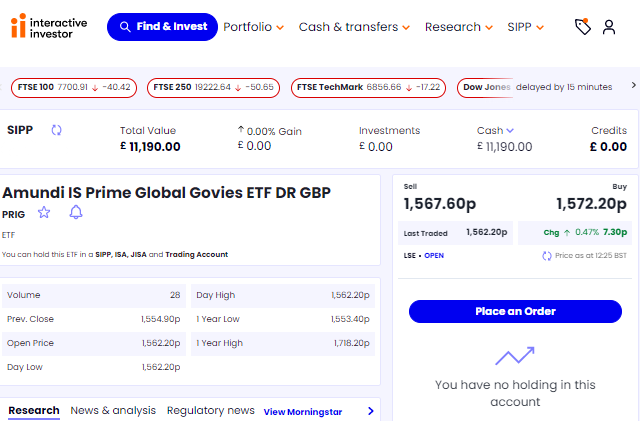
I then click the blue “Place an Order” button and the following screen appears:
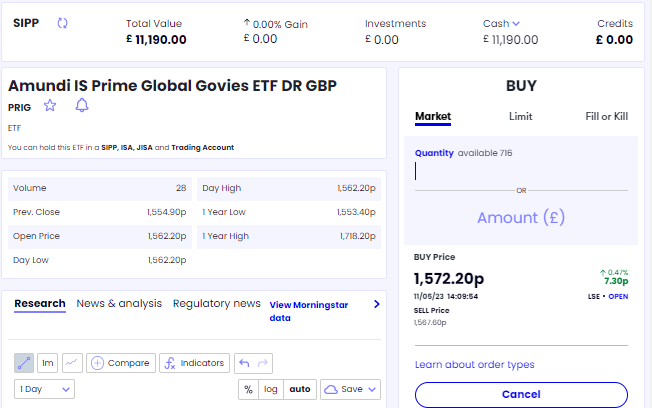
At this stage, I type in the amount. I’ll assume that I’m just investing £10,000 so that there is a more realistic comparison with the Fidelity investment. I’ll be sharing the performance and costs of both on my website.
I place an order for £800 as this aligns with the table a few pages earlier that is appropriate for me – a higher-risk investor with £10,000 to invest.
I type “800” into the “Amount (£)” line. The website automatically tells me roughly how many units of the fund I can buy for that, in this instance, it estimates 51 units (the price of units changes all the time, so £800 might buy more or fewer units the next day):
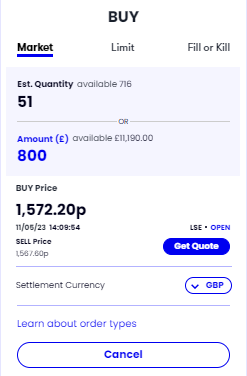
I then make sure that the “Market” tab is selected at the top of the screen, i.e. I check the word is in a bold font and underlined in blue. This means that the price quote I get will be whatever the latest price is in the market. I’m not interested in “Limit” or “Fill or Kill”. These are means by which I could try to get a better price, but it’s too time-consuming and complicated for the sake of a small, short-term advantage which is not guaranteed anyway.
Next, I click the blue “Get Quote” button which brings this up on screen:
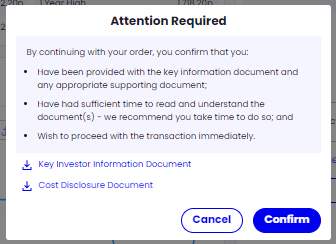
Next, I will choose to download the documents if I so wish (if I weren’t familiar with these and wanted the documents, I would download them).
I then click the blue “Confirm” button, which brings up this screen:
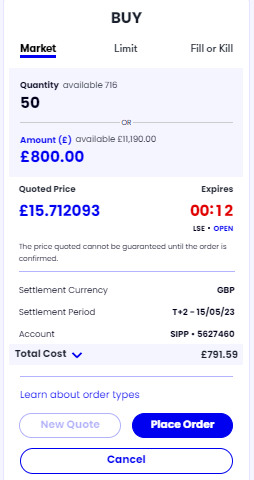
I have 15 seconds in which to click the blue “Place Order” button. I won’t be pressured by this. If I’m unsure about anything or want to double-check that I’m buying the correct amount of the correct fund, I can just let the clock run down which would bring up this screen:
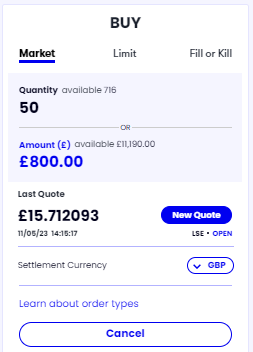
I can then click “New Quote” which will bring up the 15-second “Place Order” box again.
Once I click the blue “Place Order” button, I get this screen:
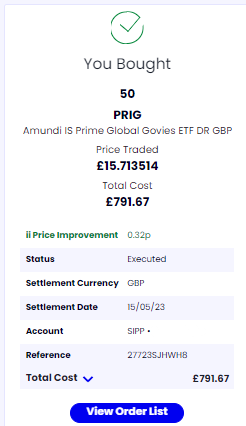
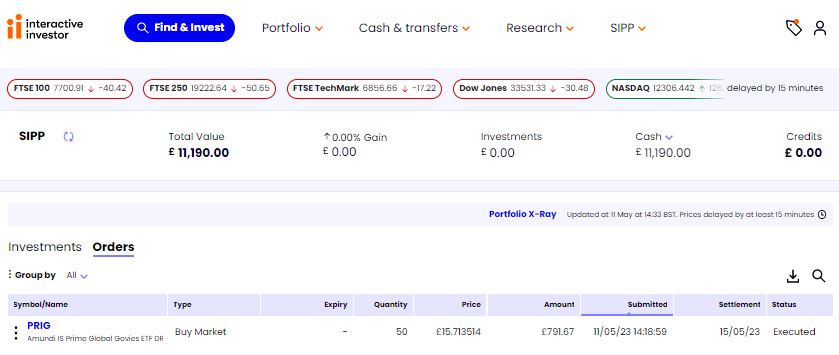
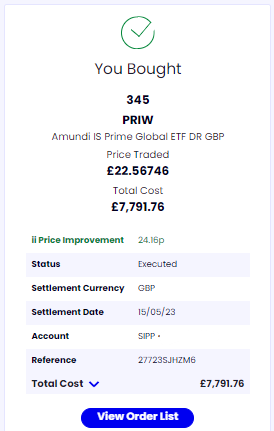
In the end, I only got 50 units of the fund, not the 51 that the website originally estimated. I’m not worried about that difference. The total cost was £791.67. I have to click the blue arrow next to the words “Total Cost” to see how the cost breaks down:
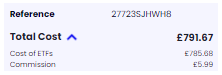
Interactive Investor charged £6 for the transaction, which compares favourably to the £7.50 which Fidelity charges.
Viewing the order list to see the fund I’ve bought
If I click the blue “View Order List” I can see the one fund that I’ve bought:
Buying the second fund
Now I can repeat the process for the next fund I want to buy: £800-worth of the global corporate bond fund with the ISIN IE00BLRPQM83.
I click on the blue “Find & Invest” button at the top of the screen and enter the ISIN IE00BLRPQM83:
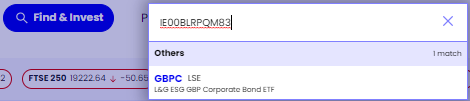
I then click on the fund that comes up:
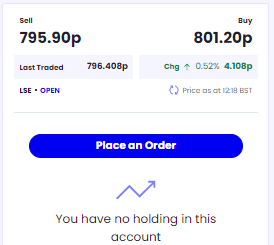
It’s still saying “You have no holding in this account”. This message means that I have no holding of this specific fund in my account, which is correct.
I click the blue “Place an Order” and insert the £800 in the “Amount (£)” box:
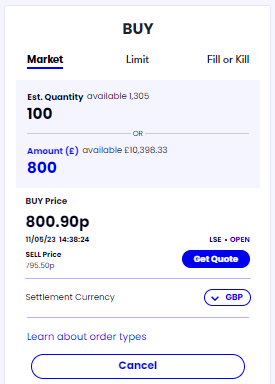
Next, I click “Get Quote” which brings up the “Attention Required” box again:
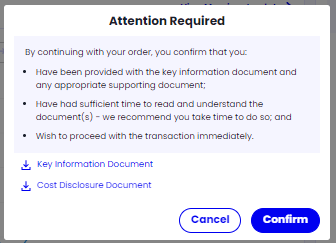
I’m now happy to click the blue “Confirm” button which brings up the 15-seconds “Place Order” screen:
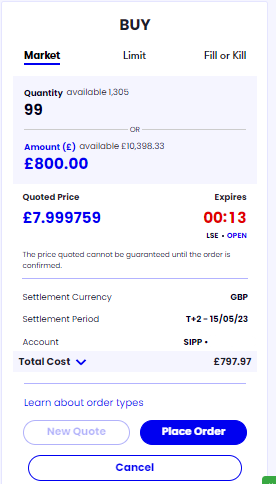
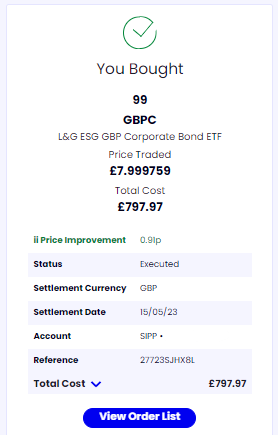
I click the blue “Place Order” button which brings up the “You Bought” box:
Buying the third fund
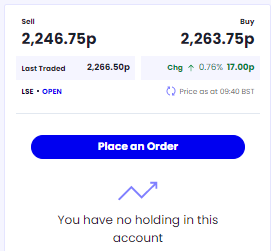
Next up, I enter £7,800 in the global shares fund with the ISIN LU1931974692.
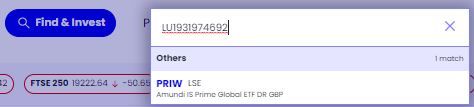
I then click the blue “Place an Order” button:
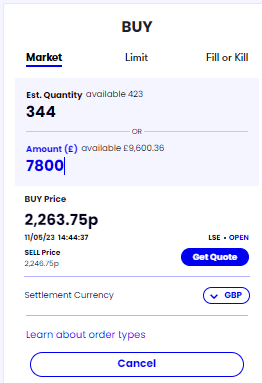
I type £7,800 into the “Amount (£)” box:
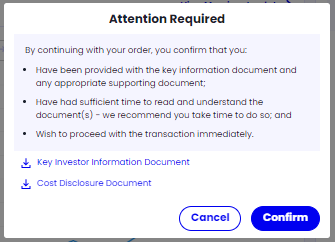
Now I click “Get Quote” which brings up the “Attention Required” box:
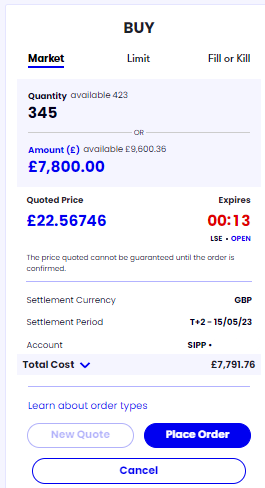
I click “Confirm”, which then brings up the 15 seconds “Place Order” box:
I now click “Place Order”, which brings up the “You Bought” box:
The fourth fund – a slightly different process because of the fund’s daily pricing
The fourth and final fund I want to buy is the alternatives i.e., real estate, fund with the ISIN GB00B5BFJG71.
You know the tune by now, so sing along.
Click the blue “Find & Invest” button at the top of the screen and enter the ISIN:
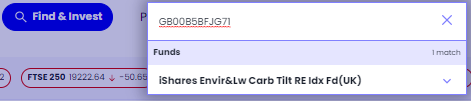
This fund is priced once a day. The other funds I’ve bought are traded all the time, so their prices go up and down throughout the day.
Hence the process of buying this fund is slightly different.
The first small difference is that I have to click the fund name which reveals the actual fund in a drop-down list (albeit a list of one fund):
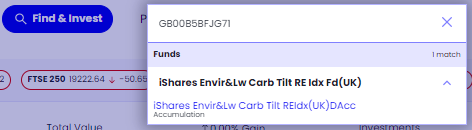
Now I can click on the blue fund name. This prompts the “Place an Order” box to appear:
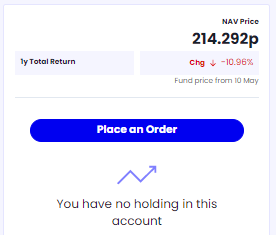
I click “Place an Order”, and then type £500 into the “Amount (£)” box:
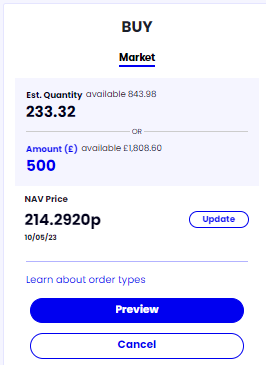
The second slight difference with this fund is that I have to click the “Preview” button. This brings up the first of two “Attention Required” screens:
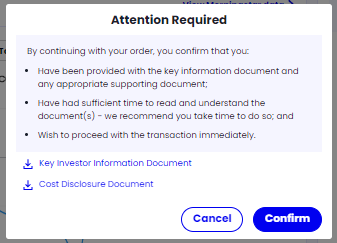
I now click the blue “Confirm” button to bring up this screen:
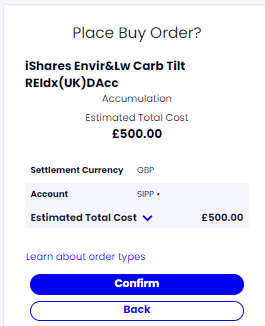
You should note that there is no estimate of how many units the £500 will buy because the fund hasn’t been priced for the day. Not anything to worry about: it’s just a different pricing process. You put your money in the box and wait to see how much it buys over the coming 24 hours or so.
I then click the “Confirm” button which brings up a different “Attention Required” message:
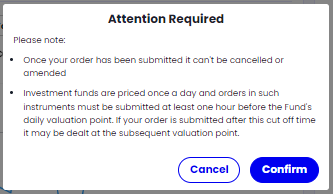
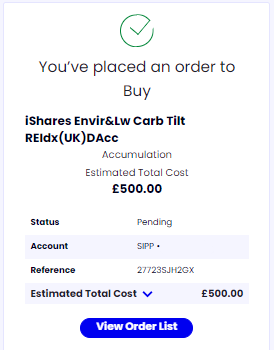
The final screen is a “You’ve placed an order to Buy” screen:
Reviewing the funds I’ve bought
Now I done all four fund, it’s time to take a look at the order list again:
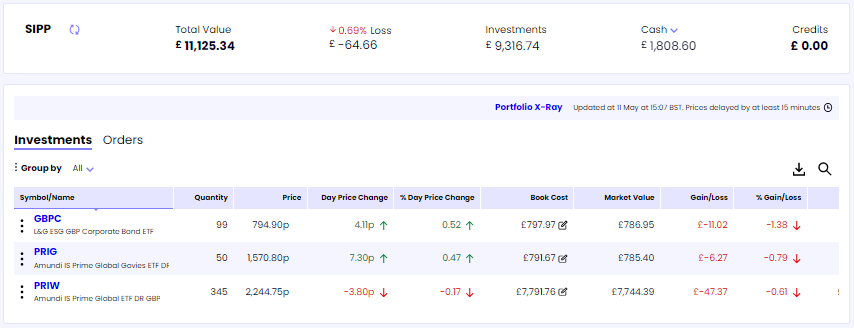
The first thing to note is that there are only three orders placed. That’s coz I’m waiting for a day or so until the real estate fund is priced and my order is completed. I’ll come back a day later and have a look to make sure it’s gone through.
To see what orders I have placed but that have not yet completed, I click the “Portfolio” tab at the top of the screen and then click “Orders”:
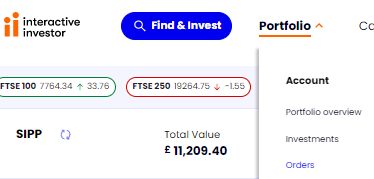
This shows me that I do indeed have one order pending that has not yet completed.

Secondly, I have made a 0.69% or £64.66 loss. This is because the investment company makes money from you whenever you buy or sell something. There are two main ways in which it does this:
- Buy/sell spread. If you want to buy a fund that has a “mid-price” of, say, £10, that’s not what you can actually buy or sell it for.
The company will sell it to you at its “buy-price” of, say, £10.50.
And it will buy it from you at its “sell-price” of, say, £9.50.
Either way, it will make a small profit on the transaction. - Transaction fee. This varies from platform to platform. As I’ve shown above, the transaction fee with Interactive Investor is £6.
I don’t worry about this small loss because I’m only going to buy funds when I have at least £500 to invest (preferably more). If I have less than £500, I’ll wait until I have at least £500 to invest before buying anything, otherwise I’ll be losing too big a portion of that money in the buy/sell spreads and transaction fees.
A couple of days later all four fund purchases are showing on my account
As a property fund that’s priced on a daily basis, this order took a couple of days to go through. Once that’s done, my orders list looks like this:
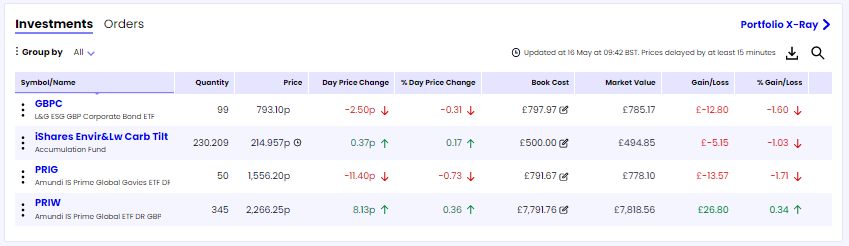
There are some minor losses and gains shown in the “Gains/Losses” right-hand column. I really don’t give a tinker’s cuss about them. I’m set up for the next 12 months, so I can get on with my life and forget about my investments in the meantime.
*Links to the internet that have an asterisk (*) denote an affiliate link. This helps to keep the website free to use as the links are tracked to that website. Using the affiliate link can (but not always) lead to a payment to the InvestWithoutBeingRippedOff.com website.
Return to the top of the screen
Next steps
I can now go off and live my life for a year without thinking too much about investments. They are designed to take care of themselves.
What I do need to consider is when to add money and, if I want to, how much the portfolio is costing and what the performance is. I cover these points on the following pages on this website:
Performance and Costs – with monthly updates on how the portfolio that I set up is doing.
After Investing – what I do on an annual basis to keep my investments in line with the portfolio I’m copying, and how I add money to that portfolio in a cost-efficient way.